Download free samples to experience the cutting edge interactive features of the ArtScroll Digital Library – Wasserman Digital Initiative.
Download Instructions:
- If you don’t have the the ArtScroll Digital Library app already – you can download the ArtScroll app from the App Store.
- Once the app is installed, open it and click on the menu button on the top left, then select the second option for the store.
- Click on the icon that says All Free Downloads.
- Scroll down to your choice of free downloads and click on the button that says “free” to begin your download.
- The free sample will now appear in your library. You can browse, learn end experience the interactive features of The ArtScroll Digital Library – Wasserman Digital Initiative.
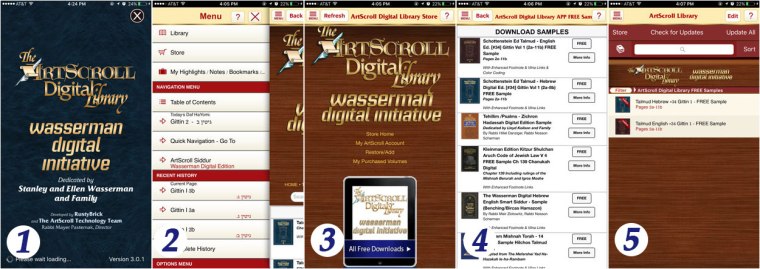
- Step-by-step screenshots. Click on image to open full size.
After you try out the FREE samples – you can purchase a complete Volume or a complete set – in one of three ways – (see all purchasing options) :
To View our online Manual and Knowledge base which describes all the features of the app and answers common questions please visit http://kb.artscroll.com
Click here for more information about the ArtScroll App and Available Digital Volumes.


 The Official ArtScroll Blog